
Anthropic · 6 min read
Use an Anthropic API key with Fyslide
Pay per use with your own Anthropic key: where to get it, how to save it encrypted on your computer, and what it costs.
With an Anthropic API key Fyslide talks to Claude models directly, with no CLI to install. You pay Anthropic for what you use.
What it is and who it suits
Choose this if you want Claude’s writing without installing Claude Code, if you are not on a Claude plan, or if you prefer predictable per-request billing over plan limits. It can read images, so it covers screenshots too.
Get a key
- Sign in to the Anthropic Console and add billing so requests can run.
- Open Settings → API keys and create a key. Copy it once; the Console will not show it again.
- Optional but wise: set a monthly spend limit in the Console.
Set it up in Fyslide
- Open Settings in Fyslide and find the AI section.
- The Anthropic row shows Key needed. Paste your key (it starts with
sk-ant-) into the field and click Save. The row changes to Key saved and the line “Key saved (encrypted on this computer)” appears, with Replace and Remove buttons. - Select the Anthropic radio button.
- Click Test. The test is a paid call: one tiny text request and one tiny picture, which costs very little.
- Fyslide pre-fills Model and Fast model (screenshots, tags). Change them only if you want a different Claude model.
- Use Create. Before a paid run Fyslide shows an estimate and asks you to confirm.
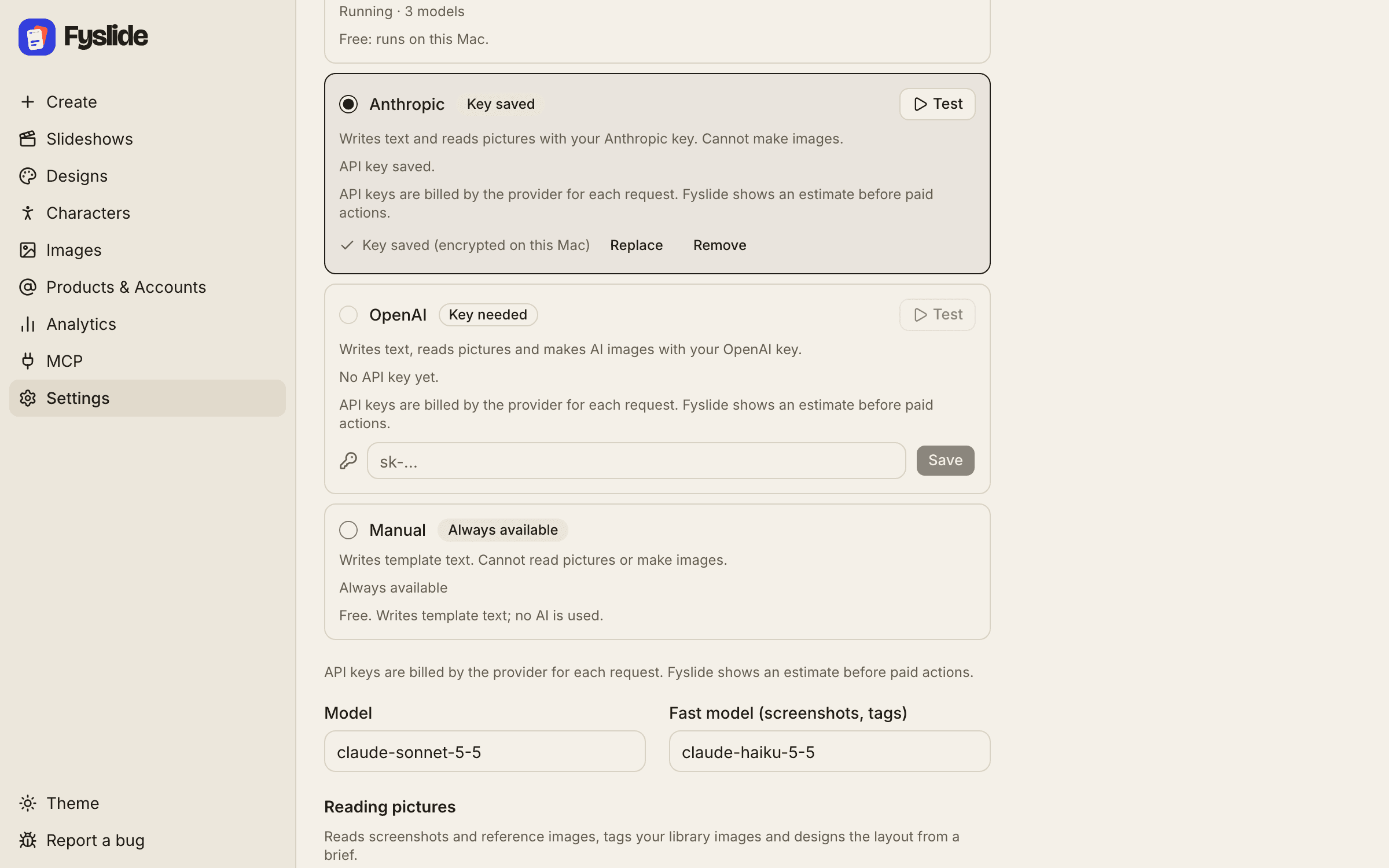
The key is encrypted with your computer’s secure storage (macOS Keychain, or Windows DPAPI) and is sent only to Anthropic. Keys can only be saved in the Fyslide desktop app.
Vision
Yes. Screenshots, New from screenshots and image tagging go to Claude as image inputs, using the Fast model for the lighter jobs.
Cost
Anthropic bills each request to your Console account. Fyslide itself adds nothing and shows an estimate before paid actions. Generating images is a different service: it needs an OpenAI API key, whichever text provider you chose.
Troubleshooting
| What you see | What to do |
|---|---|
| Badge “Key needed”, or “Anthropic needs an API key. Add your key in Settings → AI …” | Paste a key into the Anthropic row and click Save. |
| “Anthropic rejected the API key (HTTP 401).” | The key is wrong, revoked or from another organization. Click Replace and paste a fresh one. |
| “Anthropic rate limit reached.” | You hit the Console’s rate or spend limit. Wait for the time shown, raise the limit in the Console, or use another provider. |
| “Anthropic returned an error (HTTP …)”, “did not answer within 120 s” | Usually temporary. Try again later, or switch provider for this run under Create → Advanced → Text generation. |
| “Secure storage is not available on this computer, so a key cannot be saved.” | Your system’s secure storage is unavailable. Use a CLI provider or Ollama instead. |
Claude and Anthropic are trademarks of Anthropic, PBC. Fyslide is not affiliated with or endorsed by Anthropic.
Logos are shown only to identify the services you can connect to Fyslide.