
Codex · 7 min read
Use Codex CLI with Fyslide
Write slides with the Codex CLI you are signed in to with ChatGPT, and let Codex drive Fyslide through MCP.
Codex CLI is OpenAI’s coding agent for the terminal. Fyslide can use it as the AI that writes your slide texts, and Codex can also drive Fyslide through MCP.
What it is and who it suits
Choose this if you already have a ChatGPT plan (or an OpenAI account) and use Codex. Fyslide calls your signed-in codex command, so you manage no API key and pay no extra per request. It can read images, so it covers the vision features too.
Install and sign in
OpenAI’s standalone installer, Homebrew and npm all work:
curl -fsSL https://chatgpt.com/codex/install.sh | sh
# or
brew install --cask codex
# or
npm install -g @openai/codex
Then run codex in Terminal and choose Sign in with ChatGPT (or sign in with an API key). codex login starts the sign-in directly. See the Codex CLI docs for the details.
Set it up in Fyslide
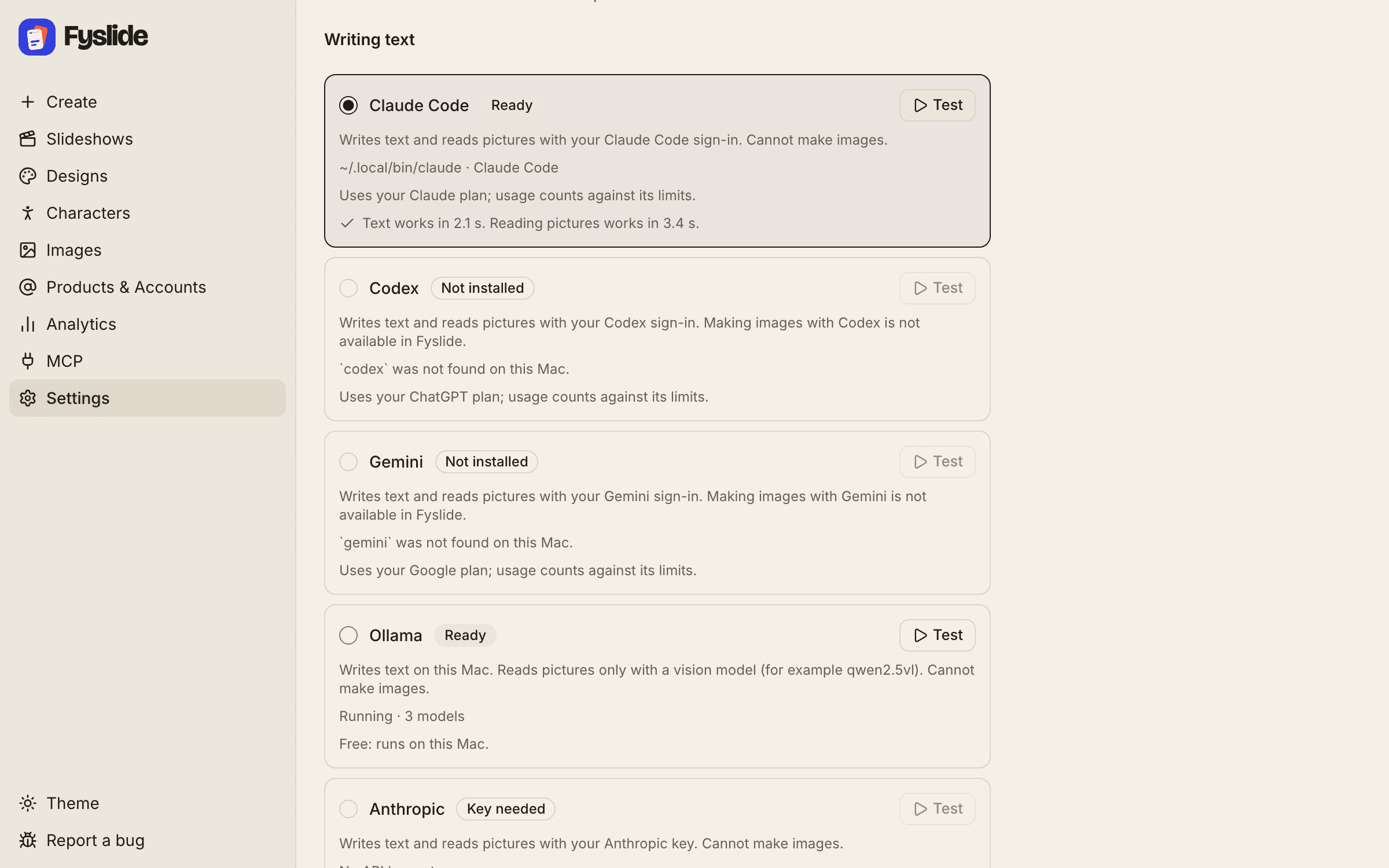
- Open Settings and look at the AI section at the top.
- The Codex row should show Ready with the path and version of
codex. Not installed means Fyslide cannot find the command; install it and switch back to Fyslide. - Select the Codex radio button. It saves automatically.
- Click Test. You should see “Text works in … s. Reading pictures works in … s.”
- Optional: Model (optional). Empty means Codex uses its own default model.
- Use Create as usual. Under Advanced → Text generation you can override the provider for one run.
Fyslide runs codex exec in a read-only sandbox, with approvals off and its shell and web tools disabled, in an empty temporary folder. Codex only returns text; it cannot change your files.
Vision
Yes. Pictures are handed to Codex as image inputs, so New from screenshots in Designs, Create → From screenshots and image tagging all work.
Cost
Usage counts against your ChatGPT plan and its limits (or your OpenAI account, depending on how you signed in). Fyslide adds nothing. Generating images with AI is separate and needs an OpenAI API key; Fyslide cannot use your ChatGPT sign-in for that.
Let Codex drive Fyslide (MCP)
- Keep Fyslide open and licensed.
- Open MCP in the sidebar and click Connect next to Codex (Repair if it says Needs repair).
- Start a new Codex session.
codex mcp listshowsfyslide, and/mcpin a session lists the active servers. - Ask in plain language, for example: “List my Fyslide designs and create a 6-slide slideshow about ‘3 stretches for desk workers’ using the photos in ~/Pictures/stretches.”
Connect adds this table to ~/.codex/config.toml. An existing file is backed up next to the original as .fyslide-backup and nothing else in it is changed:
[mcp_servers.fyslide]
command = "/Applications/Fyslide.app/Contents/Frameworks/Fyslide Helper.app/Contents/MacOS/Fyslide Helper"
args = ["/Applications/Fyslide.app/Contents/Resources/app.asar.unpacked/out/mcp/server.js"]

[mcp_servers.fyslide.env]
ELECTRON_RUN_AS_NODE = "1"
The paths assume Fyslide is in /Applications; the app writes the location of the copy you run. Costly steps come back as a plan first and Codex should only call confirm after you agree. More in the MCP workflow guide and the tool reference.
Troubleshooting
| What you see | What to do |
|---|---|
“Codex is not installed on this computer. Install it with npm i -g @openai/codex …” | Install Codex (commands above) and return to Fyslide. |
“Codex is not signed in. Open Terminal and run codex login.” | Run it, complete the sign-in, press Test again. |
| “… is rate limited (your plan’s usage limit may be reached).” | Your plan’s usage limit is used up for now. Wait until it resets, or pick another provider in Settings → AI. Fyslide never retries paid or limited calls in a loop. |
| “… did not answer within 120 s.” | The request took longer than two minutes. Try again; a very long slideshow or a busy provider can cause it. For one run you can pick another provider under Create → Advanced → Text generation. |
| “Codex returned an answer Fyslide could not read.” | Try again, or update Codex (npm i -g @openai/codex@latest or brew upgrade --cask codex). |
| Codex does not list Fyslide | Start a new session after connecting; check codex mcp list; click Repair on the MCP page if Fyslide moved. |
OpenAI, ChatGPT and Codex are trademarks of OpenAI. Fyslide is not affiliated with or endorsed by OpenAI.
Logos are shown only to identify the services you can connect to Fyslide.